Kubernetes with OIDC authentication
How does it work?
The K8S API server can be configured to support OIDC authentication based on JWT tokens by adding some parameters:
# the OIDC issuer URL
--kube-apiserver-arg oidc-issuer-url=https://keycloak.quadtreeworld.net/realms/master
--kube-apiserver-arg oidc-client-id=kubernetes
--kube-apiserver-arg oidc-groups-claim=groups
--kube-apiserver-arg oidc-groups-prefix=oidc:
--kube-apiserver-arg oidc-username-claim=email
--kube-apiserver-arg oidc-username-prefix=oidc:
Note that :
- Prefixes avoid conflicts with K8S groups
- The
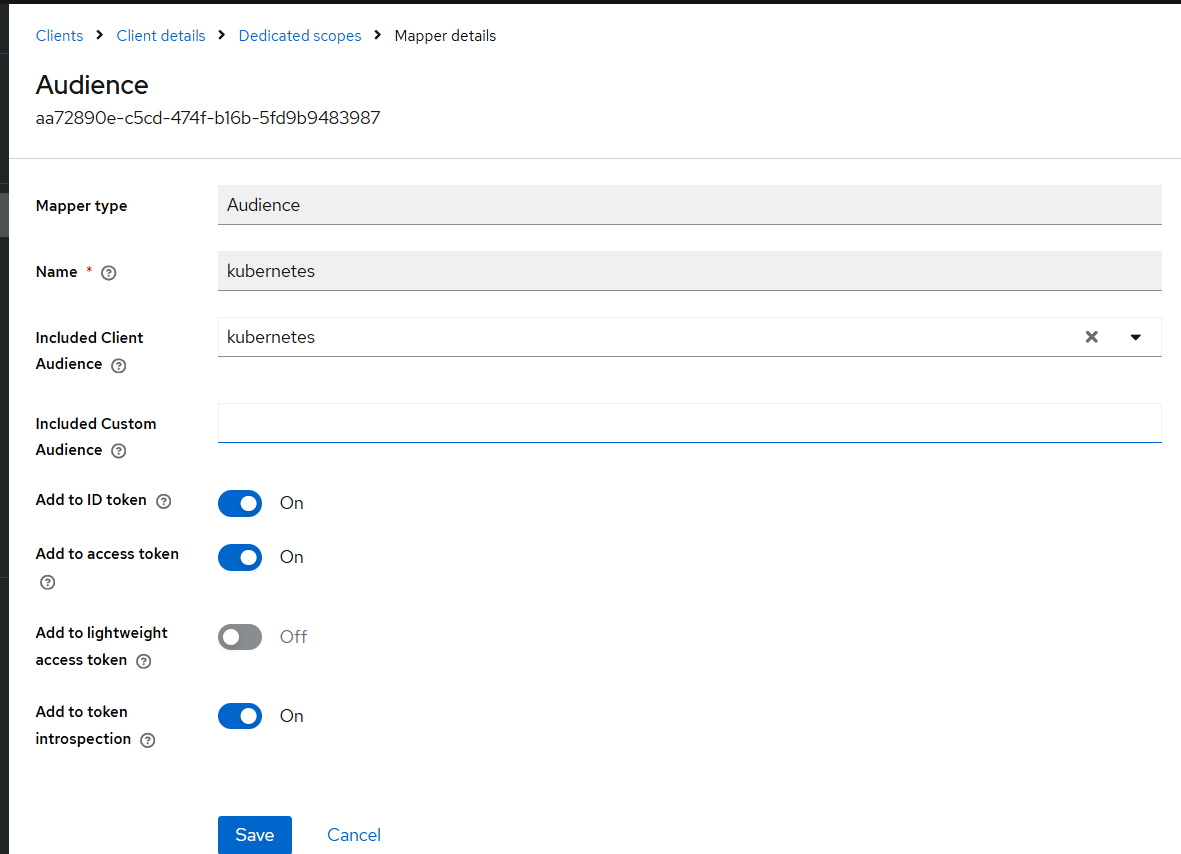
oidc-client-idis used by K8S to control the audience of the token (“aud”). So, if you use a dedicated “headlamp” client, make sure that “kubernetes” is added (see Add audience mapper with Keycloak)
Using OIDC with devbox
Note that:
- docker-devbox - kind allows to create a Kind cluster with OIDC support.
- mborne/k3s-deploy does the same with a K3S cluster (see mborne/k3s-deploy - Enabling OIDC on K3S)
- OVH - Managed Kubernetes Service allows OIDC configuration (see help.ovhcloud.com - Configuring the OIDC provider on an OVHcloud Managed Kubernetes cluster)
- Other providers like Google Kubernetes Engine (GKE) provide an equivalent feature by binding users and groups from their IAMs.
RBAC configuration with OIDC
You can assign a Role or ClusterRole to users and groups. See the following examples:
# Grant "cluster-admin" role to an OIDC user :
kubectl create clusterrolebinding oidc-mborne-admin --clusterrole=cluster-admin --user='oidc:mborne@quadtreeworld.net'

# Grant "cluster-admin" role to the member of an OIDC group :
kubectl create clusterrolebinding oidc-devbox-admins --clusterrole=cluster-admin --group='oidc:devbox_admins'

# DANGEROUS: Grant "view" role to all authenticated users
kubectl create clusterrolebinding everybody-can-view-everything  --clusterrole=view --group='system:authenticated'
RBAC debugging
# check permissions at K8S level
kubectl auth can-i list pods --as=system:authenticated
kubectl auth can-i list pods --as=oidc:mborne@example.net
kubectl auth can-i list pods --as=mborne@example.net
Resources
Add audience mapper with Keycloak
See Client / Mappers / Add mapper (by configuration) / Audience, then :
- Select “kubernetes” kubernetes
- Check “Add to ID token”
Show screenshot